AI Automations
AI Expense Suggestions
Topkey's AI reviews your card and bank transactions and suggests an accounting category (GL code) for each one, based on the merchant name, transaction amount, and your historical coding patterns. The more transactions you review, the more accurate suggestions become over time.
Where Suggestions Appear
All pending suggestions are shown on the Accounting Category Suggestions page, accessible from Transactions in the left navigation. Each row displays:
- Transaction — the merchant name and amount
- Suggested Category — the GL code Topkey recommends
- Existing Category — the category already assigned to the transaction, if any
- AI Agent Version — the version of the AI model that generated the suggestion
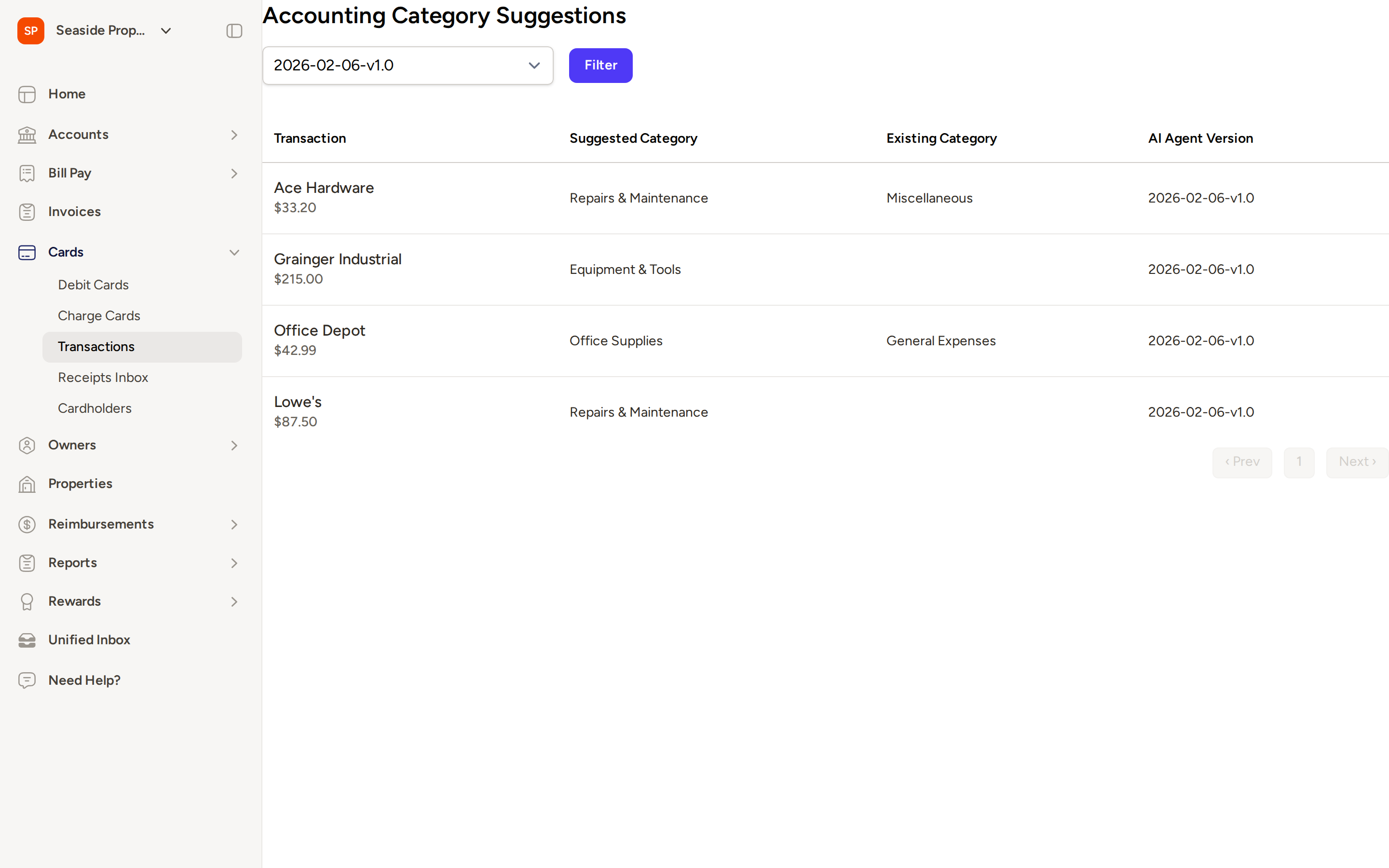
The Accounting Category Suggestions page is only visible if the feature has been enabled for your account. Contact Support if you don't see it under Transactions.
Confidence Scores
Each suggestion includes a confidence indicator — High, Medium, or Low — that reflects how certain the AI is about its recommendation. Topkey evaluates several factors when calculating confidence:
- How closely the merchant name matches typical vendors for the suggested category
- Whether the transaction amount is typical for that expense type
- How frequently that category is used in your chart of accounts
- Any additional context from receipts, summaries, or transaction descriptions
- Whether the category type (expense, asset, liability, etc.) fits the transaction
Use the confidence level as a guide for how much scrutiny each suggestion needs. High-confidence suggestions from well-known merchants are usually safe to accept quickly. Low-confidence suggestions are worth reviewing manually before accepting.
Accepting a Suggestion
To apply a suggested GL code to a transaction:
- Go to Transactions and select Accounting Category Suggestions.
- Find the transaction you want to categorize.
- Click the green checkmark next to the suggestion to accept it.
The suggested category is applied to the transaction immediately.
Accepting suggestions also helps Topkey learn your coding preferences, which improves future suggestion accuracy.
Rejecting a Suggestion
If a suggestion doesn't look right:
- Click the X next to the suggestion to dismiss it.
- Manually assign the correct category to the transaction.
Rejected suggestions are also fed back into the model, so declining incorrect suggestions is just as valuable as accepting correct ones.
AI-Generated Transaction Descriptions
For transactions that have been split, Topkey's AI also generates a concise description summary for each split. This summary gives each portion of the transaction a clear, meaningful label based on the available context.
- Click the checkmark to accept the AI-generated description and apply it to the split.
- Click the X to reject it and keep the split's original description.
AI-generated descriptions appear at the split level, not on the parent transaction. If a transaction has not been split, no description suggestion will appear.
Bulk Accepting Suggestions
If you have several suggestions to review at once, you can accept multiple at the same time:
- Select the checkboxes next to the transactions you want to approve.
- Use the bulk actions bar that appears to accept all selected suggestions in one step.
This is useful at the end of a reconciliation period when you want to process a large batch of high-confidence suggestions quickly.
Consider filtering to only high-confidence suggestions before using bulk accept, so you're not approving uncertain categorizations in bulk.
How Topkey Learns Over Time
Every decision you make — accepting or rejecting a suggestion — is used to refine the AI model for your account. Topkey considers:
- Your historical coding patterns for similar merchants
- How consistently you apply categories across transaction types
- Context from receipts, property assignments, and transaction summaries
Accuracy tends to improve noticeably after your first few weeks of reviewing suggestions, as the model learns your chart of accounts and your preferences.
Frequently Asked Questions
When do suggestions appear for a transaction? Suggestions are generated automatically after a transaction posts to your account. They typically appear on the Accounting Category Suggestions page within a short time after the transaction is processed. You do not need to trigger the analysis manually.
Why doesn't a transaction have a suggestion? Some transactions may not receive a suggestion if Topkey doesn't have enough context to make a confident recommendation — for example, an unfamiliar merchant with no prior coding history and no receipt attached. Connecting your accounting system, attaching receipts, and consistently reviewing suggestions all help ensure more transactions receive suggestions over time.
How can I improve the quality of suggestions? The best way to improve suggestion quality is to review suggestions regularly and accept or reject them rather than leaving them pending. Attaching receipts to transactions also gives the AI more context to work with. Over time, your coding history becomes the strongest signal for accurate suggestions.